Posts Tagged ‘Retro’

Episode IV is even better than the real thing!

g2c27800

Topics in this week’s recording:

  • A Brief History of the Atari 7800 ProSystem: We didn’t cover everything including the fact the the Atari 7800 got its name by adding 2600 to 5200 or that they wanted to call it the Atari 9000. However! There are a lot of fun facts you mayn’t have known!
  • Pac-Man Games with focus on Pac-Man Championship Edition and a little rivalry within the ranks.
  • A new segment: Hidden Agenda: Unlock Your Retro. This is a segment with tidbits on secrets you may not know about in retro games.
  • eBay Finds!
  • General Mayhem
  • This podcast also features a new closing track called “Frantic Machine.”
  • Bonus outtake at the very very end.

The GridCycle GeekCast – Episode 4: The 7800 Incident

<< Hear Previous Episode | Hear Next Episode >>

Not exactly.  More like one baby was born then the other lizard baby was born seconds later, killed the human baby and took its name…  No, that’s not it either.

furyfurriespntime

Read More »»


coleco-logo


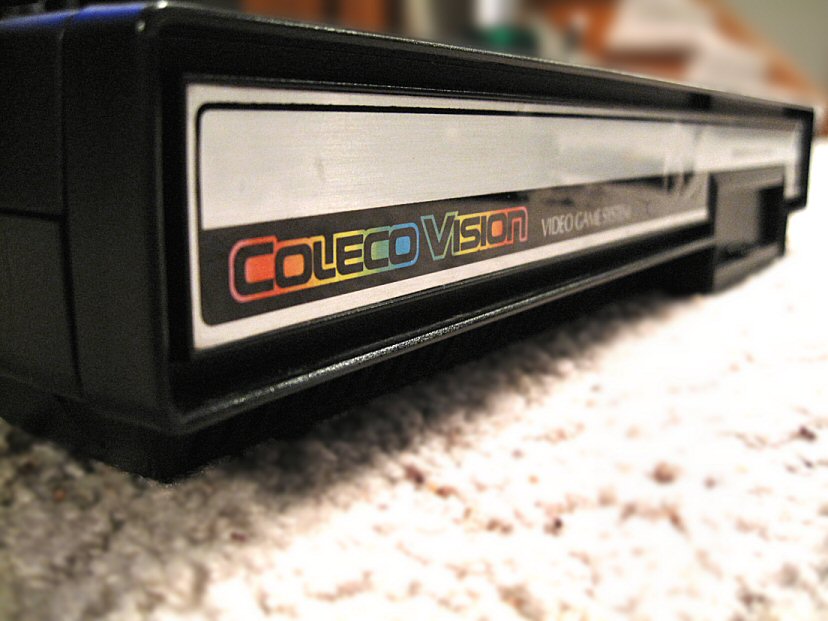
colecovision1As many of you know, I recently acquired a ColecoVision. It is the last of the early consoles that I’ve wanted to collect. I know, you can’t believe that. But it’s likely true. I managed to snag one off of CraigsList for next to nothing… a mere $20. It came with three games and two controllers. The person listing it claimed ignorance about it’s faulty behavior and mentioned nonchalantly that it, “Just needed a good cleaning.”

After getting the unit setup, I was able to make it work. However, it was very dirty and the power switch seemed a bit flakey. I decided to take the whole thing apart, clean it from top to bottom and spray some contact cleaner on the switch. I put it all back together and to my absolute shock–the power button was worse! Now I could hardly slide it back and forth (see FABombjoy’s post here). I removed the cover. The switch slid back and forth freely. Apparently the design of this model is sub-par as the screws that hold the unit together–though hand tightened–were preventing movement on the switch!

After fidgeting with the unit repeatedly, I started looking around on the interwebs and found this:

“The most common CV deck failure I’ve seen (about 6 out of 10 old decks) is power switch failure. It’s noted in the CV FAQ, but their repair tip for it is not very good (doesn’t work for me). Basically, what happens is the lubricant in the power switch dries out over the years, resulting in poor contact- which means insufficient power to the unit. You can buy a DPDT switch for it from ratshack, and that has worked for me. Thing is, soldering out the old switch, and soldering in a new one is the easy part. The HARD part is making the new (and slightly different height) switch play nice with the exterior glamour cap (the black slider you actually touch on the outside of the unit). I’ve successfully done it a number of times, but it involves a file, and a dremel, and some trial and error.”

Later I also stumbled on this:

“The standard ColecoVision power switch is a DPDT (double pole, double throw) switch. Meaning that its basically 2 switches that can be connected in one of two ways. Technically one of the throws for each pole is not used. So while the standard switch has 6 contacts, only 4 are used. The center contacts are the live contacts. The one nearest the left edge of the board is the +12V line and the inner one is the +5V line. When the switch is is slid to the rear (ON position), the center (live contacts) make contact via the internal contact slides to the rear contacts which then send the +12V and +5V to where they need to go and power on the PCB. When the switch is slid forward (OFF position) the center (live contacts) make contact via the internal contact slides to the front contacts which aren’t connected to anything. Coleco could have used a DPST switch, which is all that is needed, but DPDT switches are more standard and probably easier and cheaper to find. And by the by the -5V from the power supply is always on, which is why the ON/OFF switch is only a double pole not a triple pole.”

Those two entries (and vast other Google Searching) led me to a fix and an eventual case mod. 😉

Read More »»

summLast week there were two new releases at the Wii Store. In the Virtual Console department we were presented with Summer Games II, a Commodore 64 sports title released by Epyx in 1985 and a brand new title called: BIT.TRIP BEAT in the WiiWare department.

I was fairly excited about playing Summer Games II as I’m a big fan of the Epyx series of sports games. I bet we all have stories of sitting with our families around the computer or gaming console playing Winter Games, Summer Games and/or Summer Games II. Summer Games II sports the Javelin Throw, Kayaking, The Triple Jump, Bicycling and more. The game costs 500 Wii Points and is around 100K in size.

Let’s talk about the strengths of Summer Games II on the Wii Console. First, it’s Summer Games. Second, the graphics and sound our faithfully emulated right down to the Commodore keyboard and static load screens. Third, it hearkens back to a simpler time when games were easy to learn and fun… almost. And that’s where the good things I have to say about the game end.

Let’s talk about playing the game as it is the sore spot in this review. The gameplay (if one can call it that) is abysmal at best. Oh there are still some nifty things as you attempt to navigate throughout the game. For instance, when you press the B button you’re presented with a Commodore 64 keyboard for typing. This is necessary for the game as you are required to input your name. That would be fine if you could easily figure out how to start the game after you input your name. The game controls are sluggish and confusing and there was not a single game I could play intuitively with either the Wii’s native controller or the classic controller. This was extremely frustrating. It may be that the only strength of this release is an extensive operators manual. In order to even play an event I was forced to read each section of the manual. Now, I’m not opposed to reading–and it’s fairly convenient as all you need do is press the Wii home button to read the manual, but it was extremely disappointing that the game was not more intuitive.

If I were to rate Summer Games II on the Wii with a 5 star rating, where 3 is the standard for mediocrity, I would give the Wii Console version a 1 out of 5 stars. Minus 1 for a clumsy keyboard interface, minus 1 for non-intuitive game play, minus 1 for no consistency in the controls and minus 1 for the costing me 500 Wii points. The remaining star is given to the game as it is an Epyx title with great graphics and sound that still remind me a little of when I was a kid.

The next game in the chamber is BIT.TRIP BEAT, a neo-retro title by Aksys Games. After reading a couple of descriptions about the game I pulled the trigger and spent an additional 600 points to download this 1-4 player game. If I could describe my immediate impression of the game in one word it would be: phenomenal.
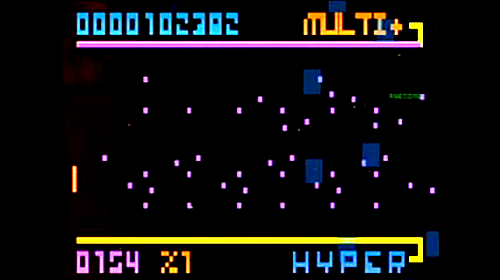
bittrip2

As you can see in the screenshot above it looks a bit like squash from the old Sears pong game. There are plenty of good things to say about this game the first of which is it feels retro right down to the opening menu. Following a fabulous 8-bit sounding intro, the menu appears sporting big blocky fonts with bright colors. Once again I’m like a deer caught in headlights: stopped cold in my tracks by something shiny.

The gameplay is simplistic and completely intuitive. Controlling the paddle is easy. Holding the Wiimote horizontally with your hands on either end you roll it back and forth like you do when you’re about to sink your teeth into a hot ear of corn on the cob. That’s it. It’s that simple! Brilliant! The object of the game is to hit each block or “ball” as it rifles toward you–very much like the gameplay in Pong. Each time you strike one of the oncoming blocks a note is played. Not just a musical note though. It’s an 8-bit sound byte. As you progress through the game the patterns and numbers of blocks heading toward you increase as do the intensity of the companion graphics, sound effects and music. BIT.TRIP’s sound can be likened to an 8-bit symphony with each block presented as a member of a retro-orchestra of which you are the conductor.

If I had to rate this game on the same scale as I did for Summer Games, it would score a 5 out of 5. Plus one for retro graphics, plus one for an awesome soundtrack, plus one for intuitive simplistic and fun gameplay, plus one for feeling more retro than Summer Games II and plus one for being well worth the points it was purchased with. If you have a Wii, this is a must purchase.

Below is a sample of the gameplay. Be sure to click the HQ button to watch in High Quality. There is also a google ad, be sure to turn that off when it pops-up. I chose this one because of it contained higher quality than others I found on the YouTube.

gameline

I do believe somebody called ‘shens’ on my statement saying that there was a modem for the Atari VCS that allowed you to download games to your system. Well, just to silence the haters, here it is. They also make mention of this little knowledge-bomb that was in doubt:

Even though the GameLine died, the investors and founding members of CVC went on to start a new company that would continue to use the technological infastructure they had built. The company, called Quantum Computer Services was created by Steve Case, among others. This company created a service called Quantum Link which linked together Commodore 64 and Commodore 128 users offering many of the expanded services originally envisioned for GameLine. Quantum Computer Services eventually changed its name to America Online in October of 1991. Though the company still (technically) exists, support for the Gameline does not.

It’s an interesting read, and the earliest example of trying to create an online gaming experience for console users. Just think, if it wasn’t for this, the X-Band modems, or The Sega Channel, we might not have the online connectivity we enjoy with modern consoles.

So, what’s the lesson here? Simple;

Commander Tim don’t shiv.

Posted under: Consoles & Handhelds
Tags: